
ATS-Optimized for US Market

Entry-Level Tech Graphic Designer Career & Resume Guide

As an Entry-Level Tech Graphic Designer, your resume needs to showcase your blend of artistic talent and technical proficiency, immediately demonstrating your value to potential employers. Hiring managers seek candidates who can translate complex technical information into visually appealing and easily understandable designs. Your resume should clearly highlight your skills in areas like user interface (UI) design, user experience (UX) principles, and data visualization. Key sections include a compelling portfolio link prominently displayed near your contact information, a skills section that highlights proficiency in tools like Adobe Creative Suite (Photoshop, Illustrator, InDesign), Figma, Sketch, and potentially some coding languages like HTML, CSS, or JavaScript for web design. Quantify your achievements whenever possible, such as 'Increased user engagement by 15% through redesigned website graphics.' Stand out by showcasing projects that demonstrate your understanding of data visualization, information architecture, and brand consistency within the tech industry. Mention any experience with animation software like After Effects or motion graphics creation, especially if the role emphasizes marketing or product demos. Illustrate your problem-solving abilities by explaining how you tackled design challenges and improved user experience. Emphasize teamwork and communication skills, highlighting your ability to collaborate with developers, product managers, and marketing teams. Tailor your resume to each job description, ensuring that your skills and experience align with the specific requirements of the role and the company's design aesthetic. Showcase your understanding of design trends and accessibility guidelines to demonstrate your commitment to creating inclusive and effective visual communication.
Average US Salary: $56k - $105k

Expert Tip: For Entry-Level Tech Graphic Designer positions in the US, recruiters increasingly look for technical execution and adaptability over simple job duties. This guide is tailored to highlight these specific traits to ensure your resume stands out in the competitive Entry-Level Tech Graphic Designer sector.

What US Hiring Managers Look For in a Entry-Level Tech Graphic Designer Resume

When reviewing Entry-Level Tech Graphic Designer candidates, recruiters and hiring managers in the US focus on a few critical areas. Making these elements clear and easy to find on your resume will improve your chances of moving to the interview stage.

  • Relevant experience and impact in Entry-Level Tech Graphic Designer or closely related roles.
  • Clear, measurable achievements (metrics, scope, outcomes) rather than duties.
  • Skills and keywords that match the job description and ATS requirements.
  • Professional formatting and no spelling or grammar errors.
  • Consistency between your resume, LinkedIn, and application.
  • Proficiency in key areas such as Problem Solving, Time Management, Programming/Cloud Services.

Essential Skills for Entry-Level Tech Graphic Designer

Include these keywords in your resume to pass ATS screening and impress recruiters.

Must-Have Skills

  • CriticalProblem Solving
  • HighTime Management

Technical Skills

  • HighProgramming/Cloud Services
  • MediumData Analysis

Soft Skills

  • CriticalTeamwork
  • HighAdaptability
  • MediumLeadership

A Day in the Life

A Day in the Life of a Entry-Level Graphic Designer

Your morning starts at 9 AM by checking emails and reviewing yesterday's tasks. As an Entry-Level Graphic Designer in Tech, you spend the first hour in daily stand-ups, syncing with your team on handling core responsibilities, collaborating with cross-functional teams, and driving project success. From 10 AM to 1 PM, you focus on execution. In Tech, this involves learning standard operating procedures and applying your Graphic Designer skills to real-world problems. Post-lunch (1-5 PM) is for deep work and collaboration. You might attend workshops or pair with senior members to understand the nuances of handling core responsibilities, collaborating with cross-functional teams, and driving project success within the company. Wrap up by 5:30 PM, documenting your progress. Tech professionals at this level prioritize learning and consistency to build a strong career foundation.

Career Progression Path

Level 1

Graphic Designer I (Entry Level)

Level 2

Graphic Designer II (Junior)

Level 3

Senior Graphic Designer

Level 4

Lead Graphic Designer

Level 5

Graphic Designer Manager / Director

Interview Questions & Answers

Prepare for your Entry-Level Tech Graphic Designer interview with these commonly asked questions.

Describe a time you had to redesign a graphic based on user feedback. What was the feedback, and how did you address it?

Medium
Behavioral
Sample Answer
In a recent project for a local tech startup, I designed a series of infographics to explain their cloud-based services. Initial user feedback indicated that the visuals were too complex and difficult to understand. I simplified the designs, using clearer icons and concise text, and reorganized the information flow based on user input. This resulted in a significant improvement in user comprehension, as measured by a post-redesign survey. It taught me the importance of iterative design and continuous feedback loops using platforms like InVision or user testing tools.

Explain your approach to creating a user interface for a mobile app. What design principles do you prioritize, and why?

Medium
Technical
Sample Answer
When designing a mobile app UI, I prioritize simplicity, intuitiveness, and accessibility. I start by understanding the user's needs and goals, then create wireframes and prototypes using tools like Figma or Sketch. I focus on creating a clean and consistent design, using clear typography and visual hierarchy. I also prioritize accessibility by ensuring sufficient color contrast and designing for different screen sizes and devices. I always test the design with real users to gather feedback and make improvements. Using a design system helps maintain consistency and efficiency across the project.

Imagine you are tasked with creating a marketing campaign for a new AI product. How would you approach the visual design to make it appealing and understandable to a broad audience?

Hard
Situational
Sample Answer
First, I'd research the target audience to understand their needs and preferences. Then, I'd brainstorm visual concepts that convey the product's key benefits in a clear and engaging way. I'd use a combination of illustrations, animations, and typography to create a visually appealing campaign. I'd avoid technical jargon and focus on explaining the product's value in simple terms. I would also ensure brand consistency and adhere to accessibility guidelines, using tools like Adobe Illustrator and After Effects to bring the vision to life. Measuring the campaign's success through A/B testing would be essential to optimize its performance.

What is your experience with data visualization, and how do you ensure that data is presented accurately and effectively?

Medium
Technical
Sample Answer
I have experience creating data visualizations using tools like Tableau and PowerBI. I ensure accuracy by carefully verifying the data sources and using appropriate chart types to represent the data accurately. I focus on creating clear and concise visualizations that highlight key insights and trends. I also pay attention to visual hierarchy and color coding to guide the viewer's eye and make the data easier to understand. I’m familiar with best practices for data storytelling and creating compelling narratives through visual representation.

Describe a time you faced a tight deadline on a design project. How did you manage your time and prioritize tasks to meet the deadline?

Easy
Behavioral
Sample Answer
In a previous project, I had to design a series of website banners for a product launch with a very short turnaround time. I immediately broke down the project into smaller, manageable tasks and prioritized them based on their urgency and importance. I communicated with the team to set realistic expectations and ensure everyone was aligned. I focused on completing the most critical tasks first and delegated or automated other tasks where possible. I also minimized distractions and stayed focused to maximize my productivity. Using time management techniques and communication helped me meet the deadline successfully.

You're asked to design a logo for a new cybersecurity company. Walk me through your design process.

Hard
Situational
Sample Answer
My process begins with thorough research into the company's mission, values, target audience, and competitors. I'd then brainstorm initial concepts, sketching various ideas and exploring different visual styles. I'd consider symbols and imagery that evoke security, trust, and innovation, aligning with the cybersecurity industry. I’d use Adobe Illustrator to create digital versions of the most promising concepts, refining them based on feedback from the client and stakeholders. The final logo would be versatile, scalable, and memorable, effectively representing the brand's identity across different platforms. I would also provide a style guide outlining the logo's usage, colors, and typography.

ATS Optimization Tips

Make sure your resume passes Applicant Tracking Systems used by US employers.

Incorporate relevant keywords from the job description, such as specific software names (Adobe Photoshop, Figma, Sketch), design principles (UI/UX), and technical terms (data visualization, responsive design).
Use clear and concise section headings like 'Skills,' 'Experience,' and 'Education' to help ATS systems categorize your information accurately.
Format your skills section as a bulleted list, separating skills with commas or semicolons, to ensure ATS can easily parse and identify your key abilities.
Save your resume as a PDF file to preserve formatting and ensure compatibility with different ATS systems, preventing misinterpretations of your document.
Quantify your accomplishments whenever possible, using metrics and data to demonstrate the impact of your designs and contributions, as ATS often prioritize results-oriented language.
Tailor your resume to each job application, highlighting the skills and experiences that are most relevant to the specific role and company.
Ensure your contact information is clearly visible and accurately formatted, including your phone number, email address, and LinkedIn profile URL.
Avoid using headers, footers, tables, or images, as these elements can sometimes interfere with ATS parsing and prevent your information from being accurately extracted.

Common Resume Mistakes to Avoid

Don't make these errors that get resumes rejected.

1
Failing to quantify achievements: Instead of saying 'Designed website graphics,' say 'Increased user engagement by 15% through redesigned website graphics using Figma.'
2
Listing skills without providing context: Simply listing 'Photoshop' is not enough. Mention specific projects or accomplishments where you utilized Photoshop effectively.
3
Using a generic resume template: Opt for a clean, modern design that highlights your skills and experience without being overly flashy or difficult to read.
4
Not tailoring the resume to the specific job: Generic resumes are easily overlooked. Customize your resume to match the specific requirements and keywords of each job description.
5
Neglecting to include a portfolio link: As a graphic designer, your portfolio is crucial. Make sure it's easily accessible and showcases your best work.
6
Ignoring the company's brand aesthetic: Research the company's branding and design style and tailor your resume and portfolio to align with their visual identity.
7
Omitting relevant technical skills: Even as a graphic designer, knowledge of HTML, CSS, or JavaScript can be valuable. Include any relevant technical skills to demonstrate your versatility.
8
Poor formatting and typos: Errors and inconsistencies can create a negative impression. Proofread carefully and ensure your resume is visually appealing and easy to read.

Industry Outlook

The US Tech sector is experiencing rapid growth with 8% YoY expansion. Entry-Level Graphic Designers are particularly sought after, with the Bureau of Labor Statistics projecting above-average job growth through 2030. Peak hiring occurs in Q1 (January-March) and Q3 (August-September).

Top Hiring Companies

GoogleAmazonMicrosoftMetaStartups

Recommended Resume Templates

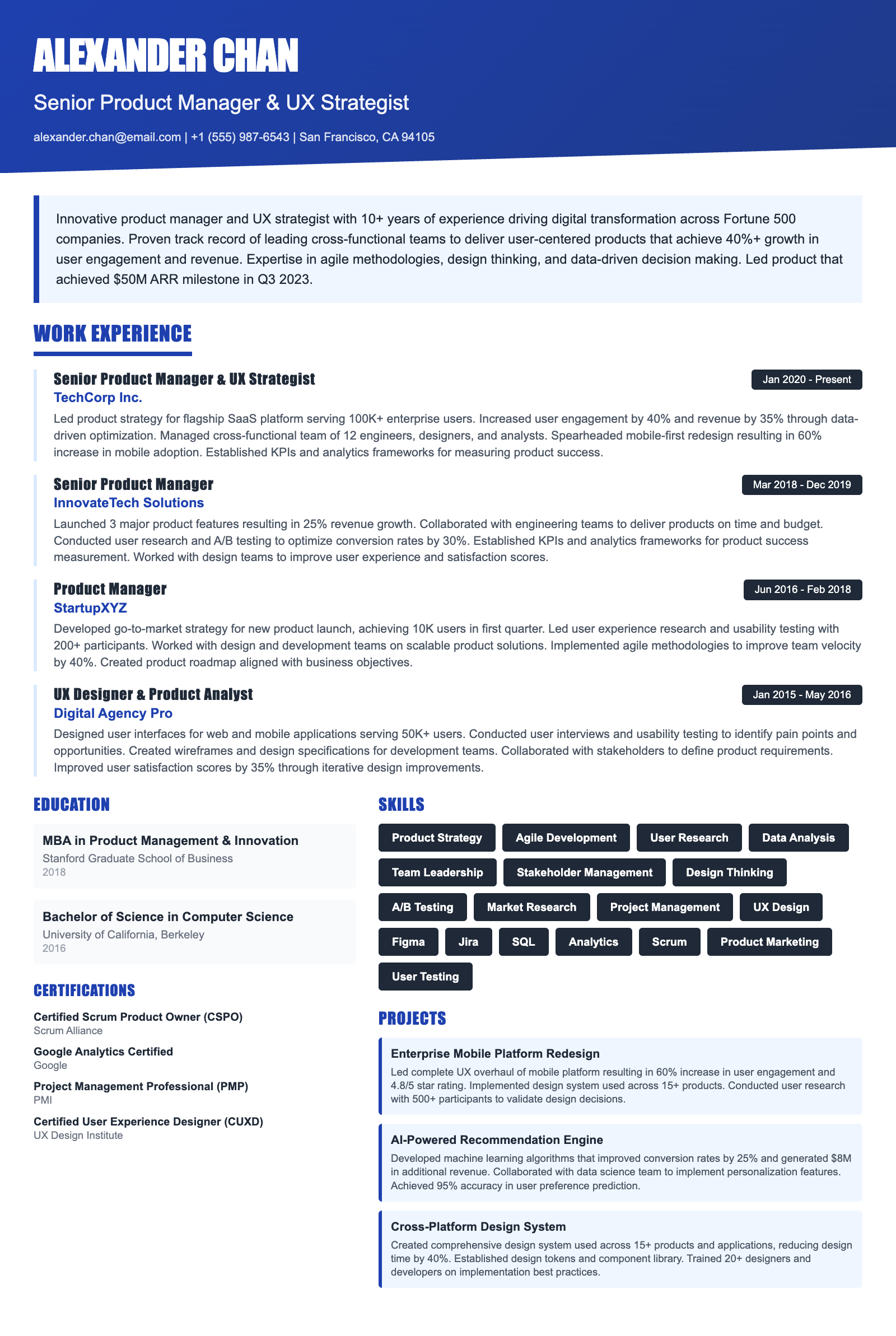
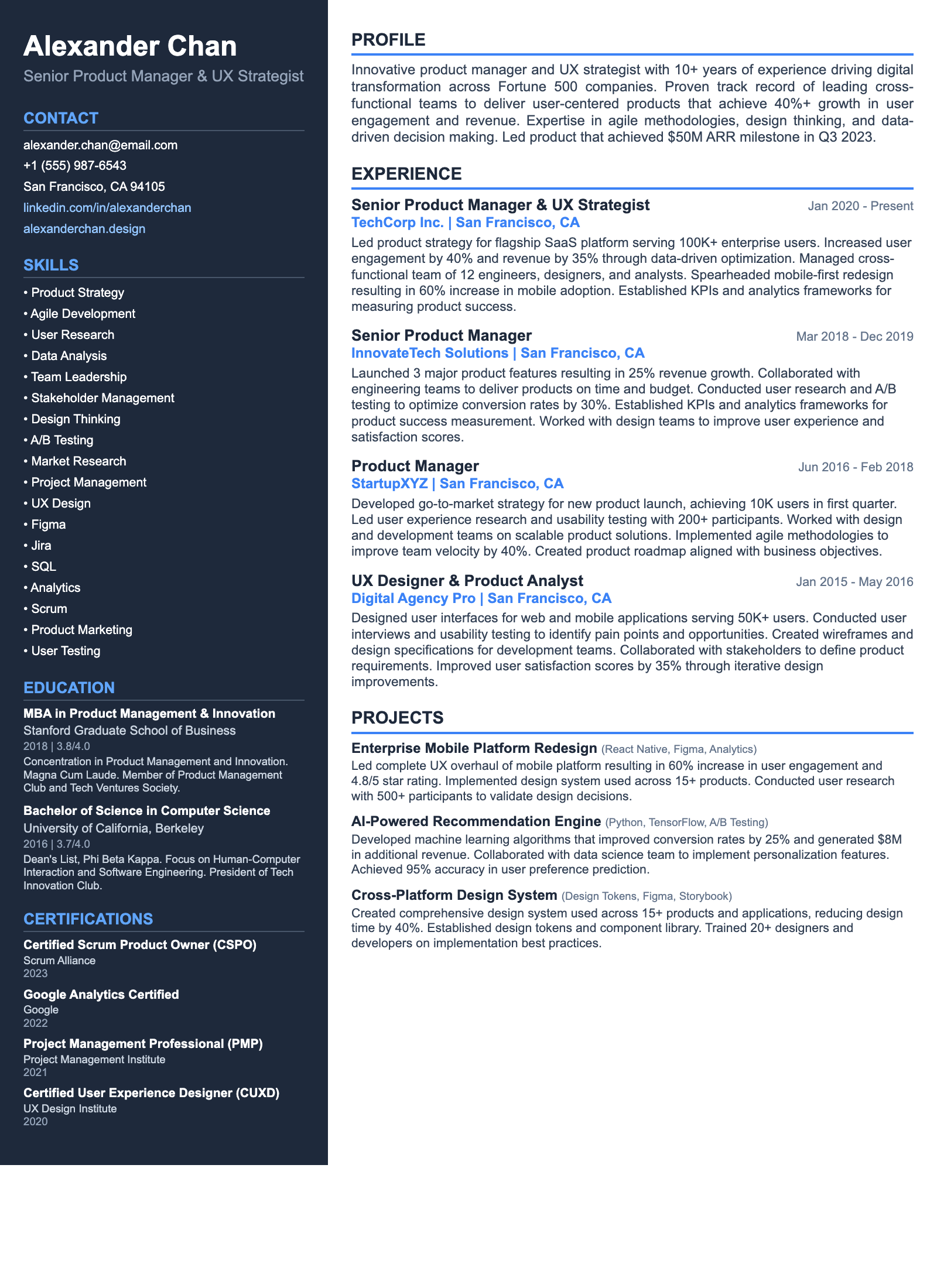
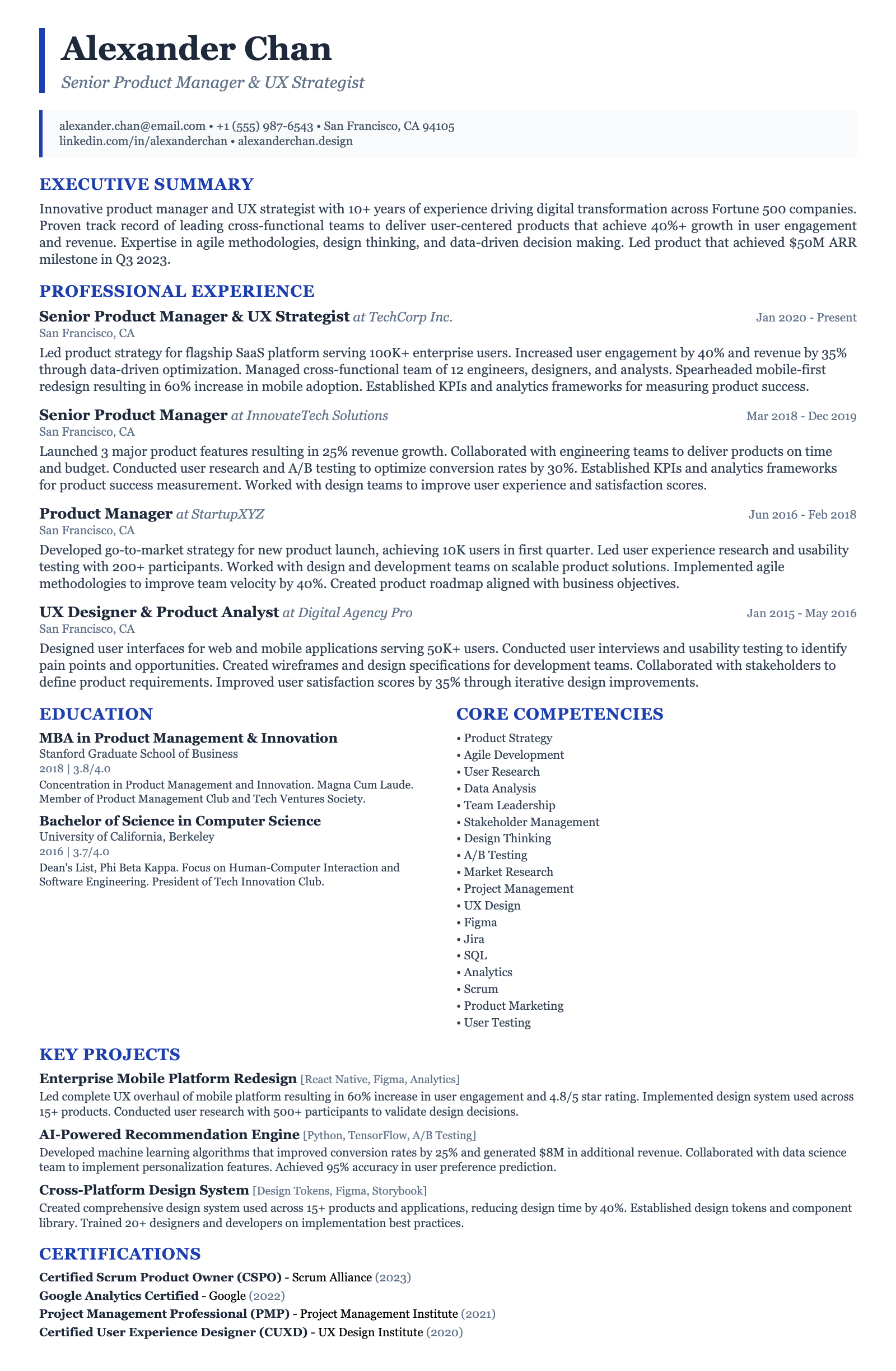
ATS-friendly templates designed specifically for Entry-Level Tech Graphic Designer positions in the US market.
Frequently Asked Questions

What is the ideal length for an Entry-Level Tech Graphic Designer resume?

Ideally, your resume should be one page. As an entry-level candidate, focus on highlighting your most relevant skills and experiences. Prioritize quality over quantity, ensuring that each bullet point showcases your accomplishments and demonstrates your value to the company. If you have a strong portfolio, make sure it's easily accessible and showcases your best work, allowing the visual elements to speak for themselves.

What are the most important skills to include on my resume?

The most important skills include proficiency in design software (Adobe Creative Suite, Figma, Sketch), UI/UX principles, data visualization, and knowledge of web design fundamentals (HTML, CSS). Soft skills such as communication, teamwork, problem-solving, and adaptability are also crucial. Tailor your skills section to match the specific requirements of each job description, highlighting the skills that are most relevant to the role. If the job lists specific knowledge of cloud services (AWS, Azure, GCP) or data analysis tools (Tableau, PowerBI), include those if applicable.

How can I optimize my resume for Applicant Tracking Systems (ATS)?

Use a clean, straightforward format with clear headings and bullet points. Avoid using tables, images, or unusual fonts that may not be recognized by ATS. Incorporate relevant keywords from the job description throughout your resume, especially in the skills section and work experience descriptions. Save your resume as a PDF to preserve formatting and ensure readability across different systems. Ensure your resume is easily scannable and searchable by ATS.

Are certifications necessary for an Entry-Level Tech Graphic Designer?

While not always required, certifications can enhance your resume and demonstrate your commitment to professional development. Consider certifications in Adobe Certified Professional (ACP), UI/UX design, or specific software skills. Online courses and certifications from platforms like Coursera, Udemy, and LinkedIn Learning can also be valuable. Highlight any relevant certifications prominently on your resume to showcase your expertise.

What are some common resume mistakes to avoid?

Avoid generic language and vague descriptions. Quantify your achievements whenever possible. Don't include irrelevant information or outdated skills. Proofread carefully for typos and grammatical errors. Ensure your resume is visually appealing and easy to read. Avoid using overly creative formatting that may not be compatible with ATS. Don't exaggerate your skills or experience. Finally, make sure your portfolio link is working and showcases your best work.

How can I transition into a Tech Graphic Designer role if I don't have direct experience?

Highlight transferable skills from previous roles, such as problem-solving, communication, and teamwork. Showcase personal projects and freelance work that demonstrate your design skills. Create a strong portfolio that highlights your best work. Take online courses or certifications to enhance your skills and knowledge. Network with professionals in the tech industry. Tailor your resume to emphasize your passion for design and your willingness to learn. Focus on showcasing your potential and your ability to contribute to the company.

Ready to Build Your Entry-Level Tech Graphic Designer Resume?

Use our AI-powered resume builder to create an ATS-optimized resume tailored for Entry-Level Tech Graphic Designer positions in the US market.

Complete Entry-Level Tech Graphic Designer Career Toolkit

Everything you need for your Entry-Level Tech Graphic Designer job search — all in one platform.

Why choose ResumeGyani over Zety or Resume.io?

The only platform with AI mock interviews + resume builder + job search + career coaching — all in one.

See comparison

Last updated: March 2026 · Content reviewed by certified resume writers · Optimized for US job market

Entry-Level Tech Graphic Designer Resume Guide (2026) | ATS-Optimized Template