
ATS-Optimized for US Market

Entry-Level Tech Systems Administrator Career & Resume Guide

Crafting a compelling resume for an Entry-Level Tech Systems Administrator role demands showcasing your foundational skills and eagerness to learn. Hiring managers prioritize candidates who demonstrate a strong grasp of core IT principles, problem-solving abilities, and adaptability. Your resume should highlight your understanding of operating systems (Windows Server, Linux), networking fundamentals (TCP/IP, DNS), and basic scripting languages (Python, Bash). Include projects or coursework that exemplify your hands-on experience with server maintenance, user account management, and troubleshooting network issues. Quantify your accomplishments whenever possible, such as 'Reduced server downtime by 15% through proactive monitoring' or 'Automated user account creation process using PowerShell scripts, saving 5 hours per week.' Detail your experience with virtualization technologies (VMware, Hyper-V) and cloud platforms (AWS, Azure) if applicable. Emphasize your teamwork and communication skills, as Systems Administrators often collaborate with various departments. A well-structured resume should include a clear skills section, a concise summary highlighting your career goals, and detailed descriptions of your educational background and any relevant internships or projects. Certifications like CompTIA A+, Network+, or Security+ can significantly enhance your candidacy. To stand out, tailor your resume to each job description, highlighting the skills and experiences that align most closely with the employer's needs and demonstrating your understanding of modern IT infrastructure and security best practices. Showcase how you've applied data analysis skills using tools like Excel or Splunk to identify and resolve system bottlenecks. Be ready to articulate how you've used leadership skills in group projects or technical teams.
Average US Salary: $56k - $105k

Expert Tip: For Entry-Level Tech Systems Administrator positions in the US, recruiters increasingly look for technical execution and adaptability over simple job duties. This guide is tailored to highlight these specific traits to ensure your resume stands out in the competitive Entry-Level Tech Systems Administrator sector.

What US Hiring Managers Look For in a Entry-Level Tech Systems Administrator Resume

When reviewing Entry-Level Tech Systems Administrator candidates, recruiters and hiring managers in the US focus on a few critical areas. Making these elements clear and easy to find on your resume will improve your chances of moving to the interview stage.

  • Relevant experience and impact in Entry-Level Tech Systems Administrator or closely related roles.
  • Clear, measurable achievements (metrics, scope, outcomes) rather than duties.
  • Skills and keywords that match the job description and ATS requirements.
  • Professional formatting and no spelling or grammar errors.
  • Consistency between your resume, LinkedIn, and application.
  • Proficiency in key areas such as Problem Solving, Time Management, Programming/Cloud Services.

Essential Skills for Entry-Level Tech Systems Administrator

Include these keywords in your resume to pass ATS screening and impress recruiters.

Must-Have Skills

  • CriticalProblem Solving
  • HighTime Management

Technical Skills

  • HighProgramming/Cloud Services
  • MediumData Analysis

Soft Skills

  • CriticalTeamwork
  • HighAdaptability
  • MediumLeadership

A Day in the Life

A Day in the Life of a Entry-Level Systems Administrator

Your morning starts at 9 AM by checking emails and reviewing yesterday's tasks. As an Entry-Level Systems Administrator in Tech, you spend the first hour in daily stand-ups, syncing with your team on handling core responsibilities, collaborating with cross-functional teams, and driving project success. From 10 AM to 1 PM, you focus on execution. In Tech, this involves learning standard operating procedures and applying your Systems Administrator skills to real-world problems. Post-lunch (1-5 PM) is for deep work and collaboration. You might attend workshops or pair with senior members to understand the nuances of handling core responsibilities, collaborating with cross-functional teams, and driving project success within the company. Wrap up by 5:30 PM, documenting your progress. Tech professionals at this level prioritize learning and consistency to build a strong career foundation.

Career Progression Path

Level 1

Systems Administrator I (Entry Level)

Level 2

Systems Administrator II (Junior)

Level 3

Senior Systems Administrator

Level 4

Lead Systems Administrator

Level 5

Systems Administrator Manager / Director

Interview Questions & Answers

Prepare for your Entry-Level Tech Systems Administrator interview with these commonly asked questions.

Describe a time you had to troubleshoot a complex system issue. What steps did you take to identify and resolve the problem?

Medium
Behavioral
Sample Answer
In my previous internship, we experienced a network outage affecting user access to critical applications. I started by checking the network devices, identifying a faulty switch. I then consulted the network diagrams to understand the impact and isolated the affected segment. After replacing the switch and verifying connectivity, I documented the incident, including the root cause and resolution steps, in our knowledge base. This situation significantly improved my understanding of network troubleshooting and the importance of clear documentation.

Explain the difference between TCP and UDP. When would you use one over the other?

Medium
Technical
Sample Answer
TCP (Transmission Control Protocol) is a connection-oriented protocol that provides reliable, ordered, and error-checked delivery of data. It's suitable for applications requiring guaranteed delivery, such as web browsing (HTTP) and email (SMTP). UDP (User Datagram Protocol) is a connectionless protocol that offers faster but less reliable data transmission. It's ideal for applications where speed is more important than accuracy, like video streaming or online gaming. I would choose TCP for applications needing data integrity and UDP where low latency is paramount.

How would you approach securing a new server being deployed in a production environment?

Medium
Situational
Sample Answer
Securing a new production server starts with hardening the operating system by applying the latest security patches and disabling unnecessary services. Next, I'd configure a strong firewall to limit network access. I would implement strong password policies and multi-factor authentication for all user accounts. Additionally, I would install intrusion detection and prevention systems (IDS/IPS) and regularly monitor system logs for suspicious activity. Regular vulnerability scans and penetration testing would further ensure the server's security posture.

What are some common monitoring tools you are familiar with, and how would you use them to maintain system health?

Medium
Technical
Sample Answer
I have experience with several monitoring tools, including Nagios, Zabbix, and Prometheus. These tools allow me to track key system metrics such as CPU utilization, memory usage, disk I/O, and network traffic. I would configure alerts to notify me of any anomalies or thresholds exceeded. By analyzing these metrics, I can proactively identify and address potential issues before they impact users. For example, high CPU utilization might indicate a need to optimize application performance or upgrade server resources.

Describe a time when you had to learn a new technology or skill quickly. How did you approach it, and what was the outcome?

Medium
Behavioral
Sample Answer
When tasked with migrating our on-premises servers to AWS, I had limited experience with cloud technologies. I enrolled in an AWS Certified Cloud Practitioner course, completed hands-on labs, and consulted with experienced cloud engineers. I set up a test environment to practice deploying and managing virtual machines, databases, and networking resources. Within a few weeks, I gained enough proficiency to contribute effectively to the migration project, successfully moving several workloads to the cloud while minimizing downtime. This showed my ability to learn quickly and adapt to new challenges.

You discover a critical vulnerability in a production system. What steps do you take?

Hard
Situational
Sample Answer
First, I would immediately assess the impact and severity of the vulnerability. I'd then isolate the affected system to prevent further exploitation. I would notify the appropriate stakeholders, including the security team and management, and collaborate with them to develop a remediation plan. This might involve applying a patch, implementing a workaround, or temporarily disabling the vulnerable service. After implementing the fix, I would thoroughly test the system to ensure the vulnerability is resolved and implement measures to prevent similar issues in the future. Communication is key throughout the process.

ATS Optimization Tips

Make sure your resume passes Applicant Tracking Systems used by US employers.

Incorporate industry-standard acronyms like 'DHCP', 'DNS', 'VPN', and 'SAN' naturally within your experience descriptions.
Use a consistent date format (MM/YYYY) throughout your resume to ensure accurate parsing by the ATS.
List your skills in a dedicated 'Skills' section, grouping them by category (e.g., 'Operating Systems', 'Networking', 'Scripting').
When describing previous roles, focus on action verbs and quantifiable results, aligning them with the job description's requirements.
Ensure your resume is free of grammatical errors and typos, as some ATS systems penalize applications with errors.
Use a simple, clean font like Arial or Calibri, and avoid decorative fonts that may not be readable by the ATS.
Optimize the file size of your resume (ideally under 1MB) to ensure it's easily processed by the ATS. Compress images if needed.
Include a 'Summary' or 'Profile' section at the top, incorporating keywords related to systems administration and your career goals. Examples: 'IT infrastructure', 'server management', 'cloud computing'.

Common Resume Mistakes to Avoid

Don't make these errors that get resumes rejected.

1
Failing to quantify achievements; instead of 'Managed servers,' write 'Managed 20+ Windows and Linux servers, ensuring 99.9% uptime'.
2
Listing generic skills without providing context; instead of 'Problem-solving,' describe a specific troubleshooting scenario where you resolved a critical system issue.
3
Not tailoring the resume to the specific job description; generic resumes are often overlooked by both ATS and hiring managers.
4
Omitting relevant certifications or training; certifications like CompTIA A+, Network+, or Security+ demonstrate your foundational knowledge.
5
Using unprofessional email addresses; create a professional email address specifically for job applications.
6
Overlooking the importance of the skills section; this is often the first section reviewed by ATS and hiring managers.
7
Not highlighting experience with cloud platforms (AWS, Azure, GCP) if applicable, as cloud skills are increasingly in demand.
8
Failing to demonstrate a proactive approach to learning and staying updated with the latest technologies; mention specific tools you self-learned, e.g., 'Proficient in Terraform after self-study'.

Industry Outlook

The US Tech sector is experiencing rapid growth with 8% YoY expansion. Entry-Level Systems Administrators are particularly sought after, with the Bureau of Labor Statistics projecting above-average job growth through 2030. Peak hiring occurs in Q1 (January-March) and Q3 (August-September).

Top Hiring Companies

GoogleAmazonMicrosoftMetaStartups

Recommended Resume Templates

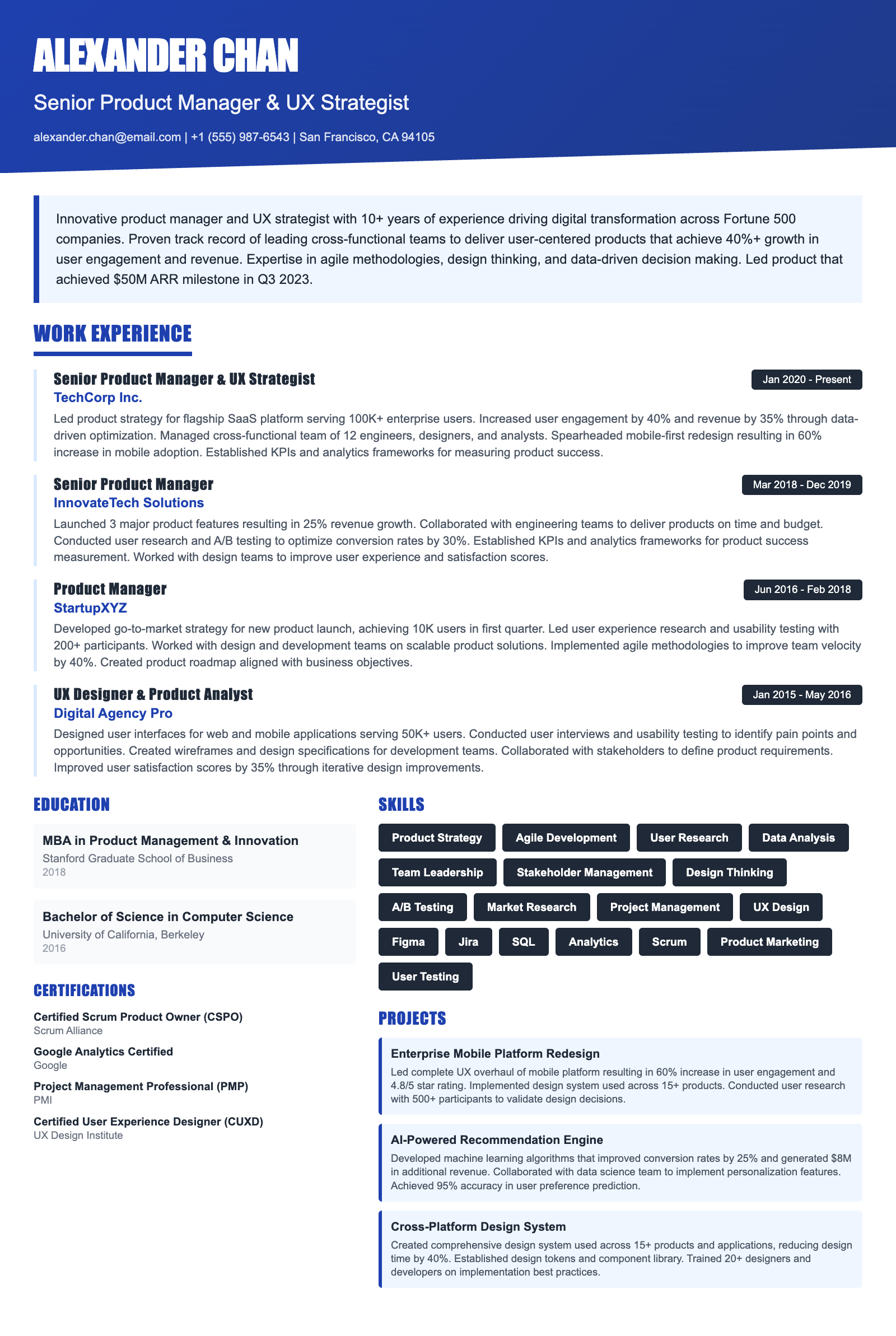
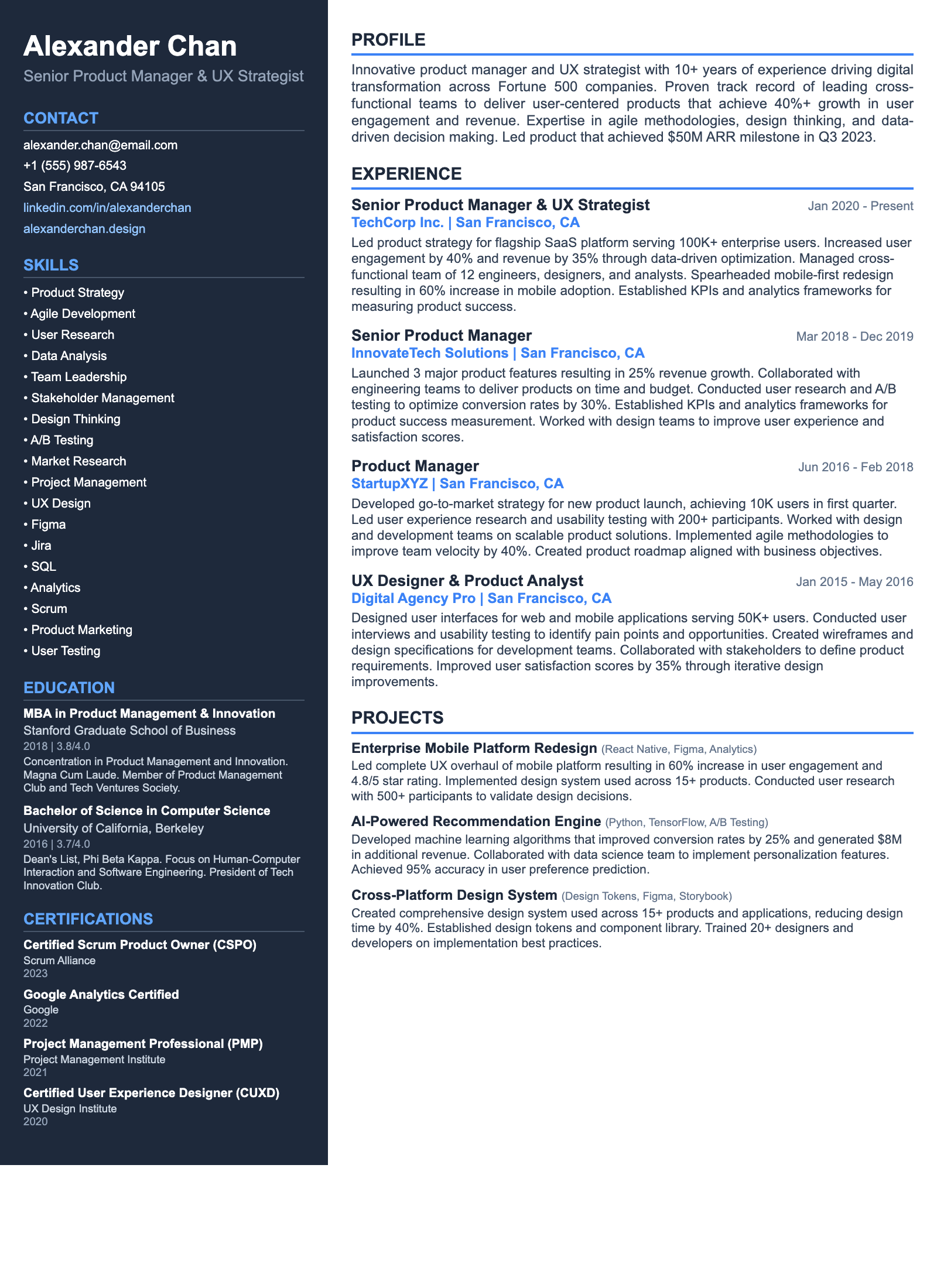
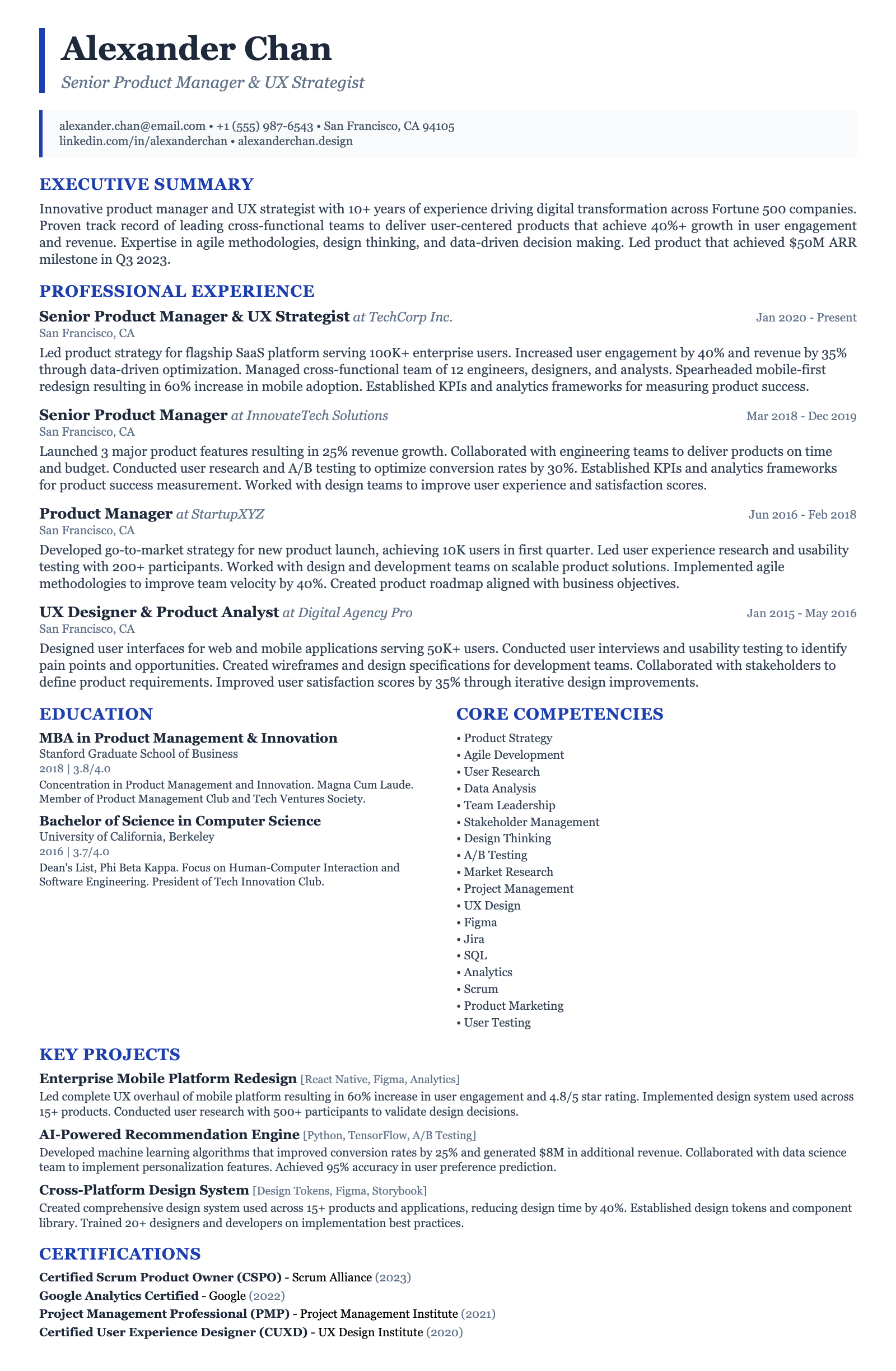
ATS-friendly templates designed specifically for Entry-Level Tech Systems Administrator positions in the US market.
Frequently Asked Questions

How long should my resume be for an entry-level Tech Systems Administrator position?

As an entry-level candidate, aim for a one-page resume. Focus on highlighting the most relevant skills and experiences. Prioritize quantifiable achievements and projects that demonstrate your understanding of systems administration concepts. For example, instead of saying 'Managed user accounts,' say 'Managed 50+ user accounts using Active Directory, ensuring compliance with security policies.' Mention coursework related to operating systems, networking, and cybersecurity.

What are the most important skills to list on my resume?

Highlight skills directly relevant to systems administration, such as proficiency in Windows Server and Linux, experience with virtualization technologies like VMware or Hyper-V, scripting skills in Python or Bash, and knowledge of networking protocols (TCP/IP, DNS). Also, include soft skills like problem-solving, teamwork, and communication. Showcase your data analysis skills by mentioning specific tools, e.g., 'Analyzed system logs using Splunk to identify and resolve performance issues'.

How do I optimize my resume for Applicant Tracking Systems (ATS)?

Use keywords from the job description throughout your resume, especially in the skills section and work experience descriptions. Format your resume with clear headings and bullet points. Avoid using tables, images, or unusual fonts that an ATS might not be able to parse correctly. Save your resume as a .docx or .pdf file. Mention specific technologies like 'Active Directory', 'PowerShell', and 'CloudFormation' explicitly.

Are certifications important for entry-level Tech Systems Administrator roles?

Yes, certifications can significantly boost your resume. Consider obtaining certifications like CompTIA A+, Network+, Security+, or entry-level certifications from Microsoft (e.g., Microsoft Certified: Azure Fundamentals) or Cisco (e.g., CCNA). These certifications demonstrate your commitment to learning and validate your knowledge of core IT concepts. Mention the certification name and date obtained (or expected date) prominently.

What are some common mistakes to avoid on my Tech Systems Administrator resume?

Avoid generic descriptions of your skills and experiences. Instead, quantify your accomplishments and provide specific examples. Do not include irrelevant information, such as unrelated job experience or hobbies. Proofread your resume carefully for grammatical errors and typos. Ensure your contact information is accurate and up-to-date. Don't forget to tailor your resume to each specific job application.

How can I showcase a career transition into Tech Systems Administration on my resume?

If you're transitioning from a different field, highlight any transferable skills that are relevant to systems administration, such as problem-solving, analytical skills, or technical aptitude. Include any relevant coursework, bootcamps, or personal projects that demonstrate your interest in and knowledge of IT systems. Create a functional or combination resume that emphasizes your skills rather than chronological work history. For example, if you worked in customer support, highlight how you resolved technical issues for clients.

Ready to Build Your Entry-Level Tech Systems Administrator Resume?

Use our AI-powered resume builder to create an ATS-optimized resume tailored for Entry-Level Tech Systems Administrator positions in the US market.

Complete Entry-Level Tech Systems Administrator Career Toolkit

Everything you need for your Entry-Level Tech Systems Administrator job search — all in one platform.

Why choose ResumeGyani over Zety or Resume.io?

The only platform with AI mock interviews + resume builder + job search + career coaching — all in one.

See comparison

Last updated: March 2026 · Content reviewed by certified resume writers · Optimized for US job market

Entry-Level Tech Systems Administrator Resume Guide (2026) | ATS-Optimized Template