
ATS-Optimized for US Market

Principal Education UX Designer Career & Resume Guide

As a Principal Education UX Designer, your resume needs to showcase your expertise in crafting user-centered learning experiences. Hiring managers seek candidates who not only possess strong UX design skills but also a deep understanding of pedagogical principles and the education technology landscape. Your resume should clearly demonstrate your ability to lead UX strategy, conduct user research with students and educators, and translate research findings into impactful design solutions. Highlight your proficiency with industry-standard tools like Figma, Sketch, Adobe Creative Suite, and prototyping tools like InVision or Axure. Quantify your accomplishments whenever possible, illustrating how your designs improved learning outcomes, increased user engagement, or streamlined educational processes. Key sections include a compelling summary, a detailed work experience section showcasing your leadership and project management skills, a dedicated skills section listing both hard and soft skills, and an education section highlighting any relevant degrees or certifications. Stand out by showcasing your experience with accessibility guidelines (WCAG) and your familiarity with learning management systems (LMS) such as Canvas or Blackboard. Emphasize your ability to collaborate effectively with cross-functional teams, including instructional designers, developers, and product managers, to deliver innovative and effective educational solutions. Mention your experience with data analysis tools like Google Analytics to demonstrate how you measure the success of your designs. Your portfolio should provide evidence of your design process and impact.
Average US Salary: $140k - $220k

Expert Tip: For Principal Education UX Designer positions in the US, recruiters increasingly look for technical execution and adaptability over simple job duties. This guide is tailored to highlight these specific traits to ensure your resume stands out in the competitive Principal Education UX Designer sector.

What US Hiring Managers Look For in a Principal Education UX Designer Resume

When reviewing Principal Education UX Designer candidates, recruiters and hiring managers in the US focus on a few critical areas. Making these elements clear and easy to find on your resume will improve your chances of moving to the interview stage.

  • Relevant experience and impact in Principal Education UX Designer or closely related roles.
  • Clear, measurable achievements (metrics, scope, outcomes) rather than duties.
  • Skills and keywords that match the job description and ATS requirements.
  • Professional formatting and no spelling or grammar errors.
  • Consistency between your resume, LinkedIn, and application.
  • Proficiency in key areas such as Communication, Time Management, Industry-Standard Tools.

Essential Skills for Principal Education UX Designer

Include these keywords in your resume to pass ATS screening and impress recruiters.

Must-Have Skills

  • CriticalCommunication
  • HighTime Management

Technical Skills

  • HighIndustry-Standard Tools
  • MediumData Analysis

Soft Skills

  • CriticalTeamwork
  • HighAdaptability
  • MediumLeadership

A Day in the Life

A Day in the Life of a Principal UX Designer

Arrive early to review metrics or sprint progress. As a Principal UX Designer, you lead the 9 AM stand-up, addressing blockers and setting the strategic direction for handling core responsibilities, collaborating with cross-functional teams, and driving project success within the Education team. 10 AM-1 PM is for high-impact decisions. You're architecting solutions, reviewing critical deliverables, or negotiating priorities with Education stakeholders. Afternoons involve mentorship and cross-org coordination. You're the go-to expert for handling core responsibilities, collaborating with cross-functional teams, and driving project success, ensuring the team's output aligns with company goals. You finish by finalizing quarterly roadmaps or reviewing next steps. At this level in Education, your focus shifts from individual tasks to organizational impact.

Career Progression Path

Level 1

UX Designer I (Entry Level)

Level 2

UX Designer II (Junior)

Level 3

Senior UX Designer

Level 4

Lead UX Designer

Level 5

UX Designer Manager / Director

Interview Questions & Answers

Prepare for your Principal Education UX Designer interview with these commonly asked questions.

Describe a time you had to advocate for a specific design solution to stakeholders who had different priorities. How did you convince them?

Medium
Behavioral
Sample Answer
In a previous role, I proposed a significant redesign of our learning platform's assessment module. Stakeholders were hesitant due to budget constraints and tight deadlines. I prepared a detailed presentation outlining the user research that highlighted the usability issues, the potential impact on student performance (backed by projected data), and a phased implementation plan that minimized disruption. I also demonstrated a high-fidelity prototype to showcase the improved user experience. By presenting a data-driven argument and addressing their concerns with a practical implementation strategy, I gained their buy-in.

How would you approach designing a new learning platform for students with diverse learning needs, including those with disabilities?

Hard
Technical
Sample Answer
I would start by conducting thorough user research with students with diverse learning needs, including those with disabilities, to understand their specific challenges and requirements. I'd then incorporate accessibility principles (WCAG) from the outset, ensuring the platform is usable by everyone. This includes providing alternative text for images, keyboard navigation, and sufficient color contrast. I'd also collaborate with accessibility experts and conduct usability testing with assistive technologies to ensure the platform meets the needs of all users. Furthermore, I would design the platform to be flexible and customizable, allowing students to adjust settings to suit their individual learning preferences.

Imagine you're tasked with improving the user experience of an existing online course that has a high dropout rate. What steps would you take?

Medium
Situational
Sample Answer
First, I would analyze existing data, like course completion rates, user feedback, and support tickets, to identify pain points. Next, I'd conduct user research with current and former students to understand their experiences and challenges. I'd also perform a heuristic evaluation of the course interface to identify usability issues. Based on these findings, I'd prioritize areas for improvement and develop a set of design recommendations. I'd then create prototypes to test different solutions and gather feedback before implementing any changes. I'd track the dropout rate and other key metrics after the changes to measure the impact of the redesign.

Describe your experience with A/B testing and how you've used it to improve the user experience of educational products.

Medium
Technical
Sample Answer
In my previous role at [Previous Company], we used A/B testing extensively to optimize the learning experience. For example, we tested different versions of our onboarding flow for new users of our math tutoring platform. One version emphasized gamification and personalized learning paths, while the other focused on a more traditional, step-by-step approach. We tracked metrics such as completion rate, engagement, and student performance. The results showed that the gamified version significantly improved user engagement and completion rates, so we implemented it as the standard onboarding flow. We use tools like Google Optimize for this.

How do you stay up-to-date with the latest trends and best practices in education UX design?

Easy
Behavioral
Sample Answer
I actively participate in online communities, attend industry conferences, and follow leading UX design blogs and publications. I also stay informed about emerging technologies and their potential applications in education. I am a member of the Interaction Design Foundation and regularly read articles on UX Matters and Nielsen Norman Group. I am also keen on experimenting with new tools like Framer and keeping up with accessibility guidelines updates. I believe continuous learning is crucial in this rapidly evolving field, and I am always looking for opportunities to expand my knowledge and skills.

How do you balance the needs of different stakeholders, such as students, teachers, and administrators, when designing an educational product?

Hard
Situational
Sample Answer
Balancing stakeholder needs requires a user-centered approach and strong communication skills. I start by conducting thorough user research with each stakeholder group to understand their unique needs, goals, and pain points. I then prioritize these needs based on their impact on the overall learning experience and the product's objectives. I facilitate collaborative workshops and design reviews to gather feedback and ensure everyone is aligned. I also use data to inform design decisions and demonstrate the impact of different solutions. Ultimately, my goal is to create a product that meets the needs of all stakeholders and promotes effective learning.

ATS Optimization Tips

Make sure your resume passes Applicant Tracking Systems used by US employers.

Incorporate keywords related to education, UX design, and specific tools throughout your resume, particularly in the skills and experience sections. ATS systems scan for these terms to identify qualified candidates.
Use a chronological or combination resume format, as these are generally easier for ATS systems to parse. Avoid complex formatting elements like tables, images, and unusual fonts that can confuse the system.
Clearly label each section of your resume with standard headings like 'Summary,' 'Experience,' 'Skills,' and 'Education.' This helps the ATS system accurately categorize your information.
Quantify your accomplishments whenever possible, using metrics to demonstrate the impact of your work. ATS systems can often extract numerical data, making it easier to assess your contributions.
List your skills in a dedicated 'Skills' section, using keywords that match the requirements of the job description. Include both hard skills (e.g., Figma, user research) and soft skills (e.g., communication, leadership).
Tailor your resume to each specific job application by highlighting the skills and experience that are most relevant to the position. This increases the likelihood that your resume will be flagged as a good match by the ATS system.
Use a consistent format for dates and locations throughout your resume. Inconsistencies can confuse the ATS system and lead to errors in data extraction.
Save your resume as a PDF to preserve formatting while still being readable by most ATS systems. Ensure the PDF is text-searchable so the ATS can accurately parse the content.

Common Resume Mistakes to Avoid

Don't make these errors that get resumes rejected.

1
Failing to demonstrate a strong understanding of pedagogical principles or learning theories. Hiring managers in education UX seek candidates who can apply these principles to design effective learning experiences.
2
Neglecting to showcase experience with accessibility guidelines (WCAG) or other relevant standards. Accessibility is crucial in education, and experience in this area is highly valued.
3
Not quantifying accomplishments or demonstrating the impact of your designs on learning outcomes. Use metrics to illustrate how your designs improved student engagement, retention, or performance.
4
Overlooking the importance of collaboration with cross-functional teams, including instructional designers, developers, and educators. Highlight your ability to work effectively in collaborative environments.
5
Failing to tailor your resume to the specific requirements of the education sector. Generic UX design resumes may not stand out to hiring managers in this field.
6
Not providing a portfolio or work samples that demonstrate your experience with education-specific projects. Your portfolio should showcase your design process and the impact of your work.
7
Omitting experience with learning management systems (LMS) such as Canvas or Blackboard. Familiarity with these platforms is often a requirement for education UX designers.
8
Focusing solely on the visual design aspects of UX and neglecting the importance of user research and usability testing with students and educators. Demonstrate a user-centered approach to design.

Industry Outlook

The US Education sector is experiencing steady growth. Principal UX Designers are particularly sought after, with the Bureau of Labor Statistics projecting average job growth through 2030. Peak hiring occurs in Q1 (January-March) and Q3 (August-September).

Top Hiring Companies

Industry LeadersRegional FirmsFast-Growing Companies

Recommended Resume Templates

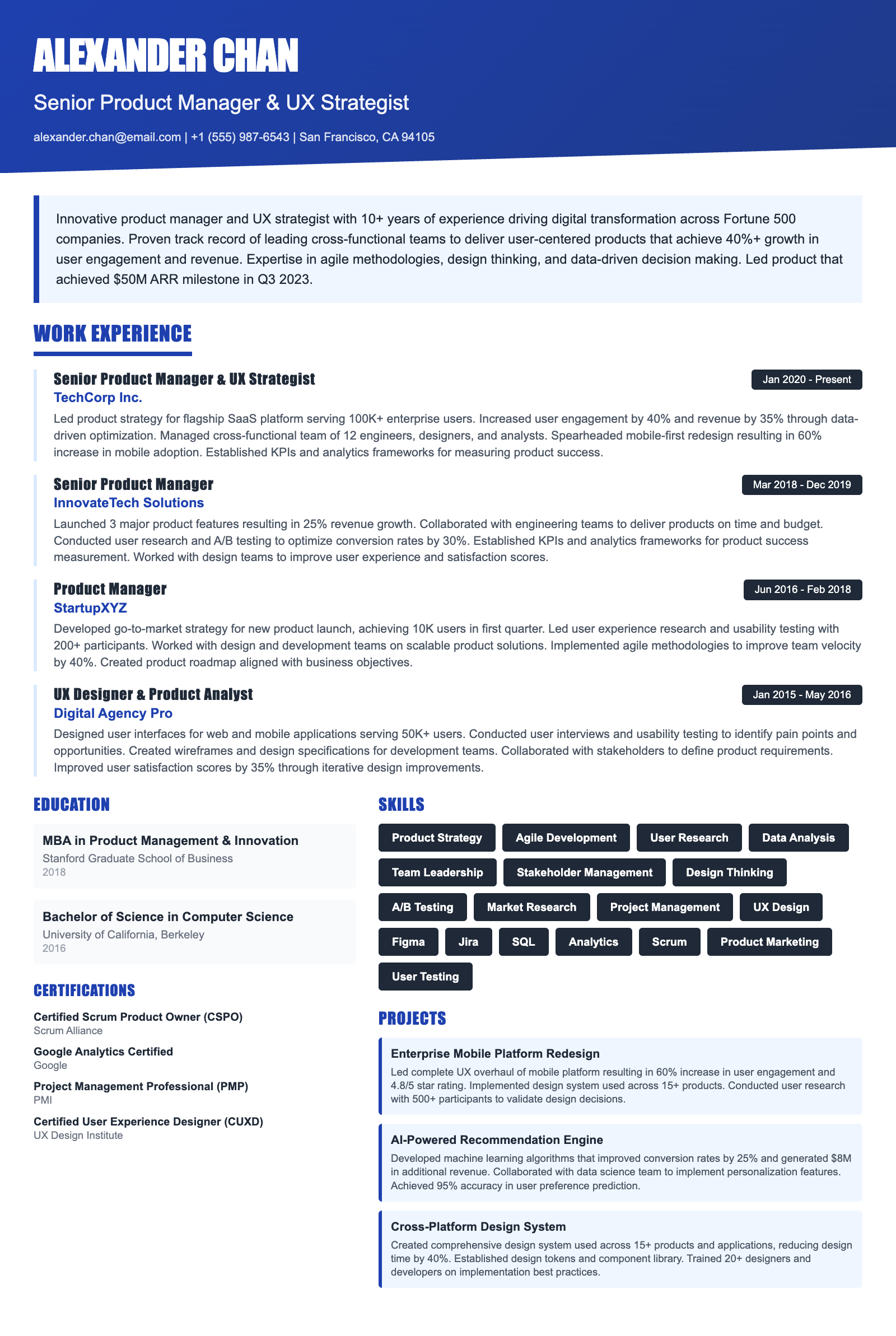
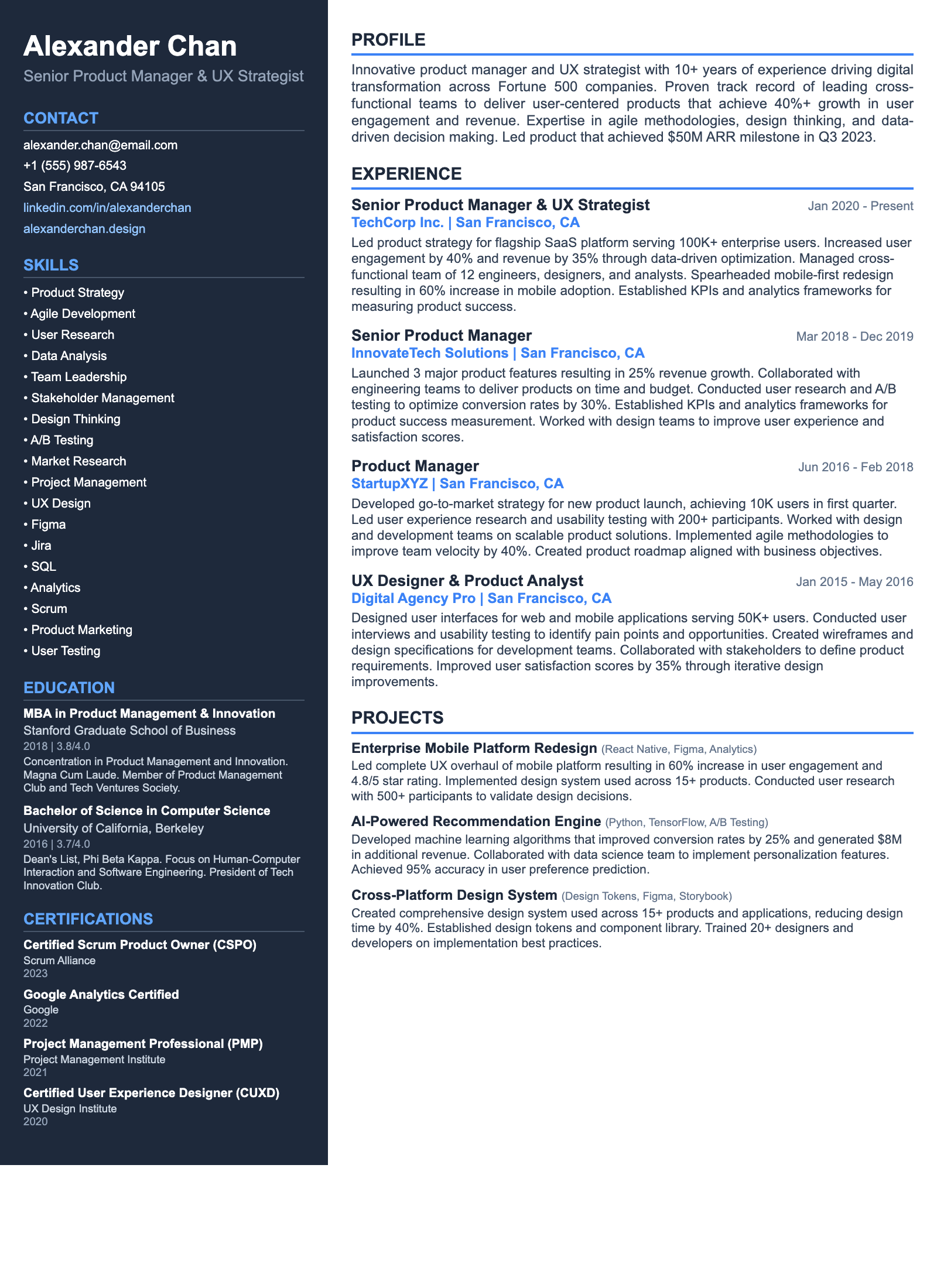
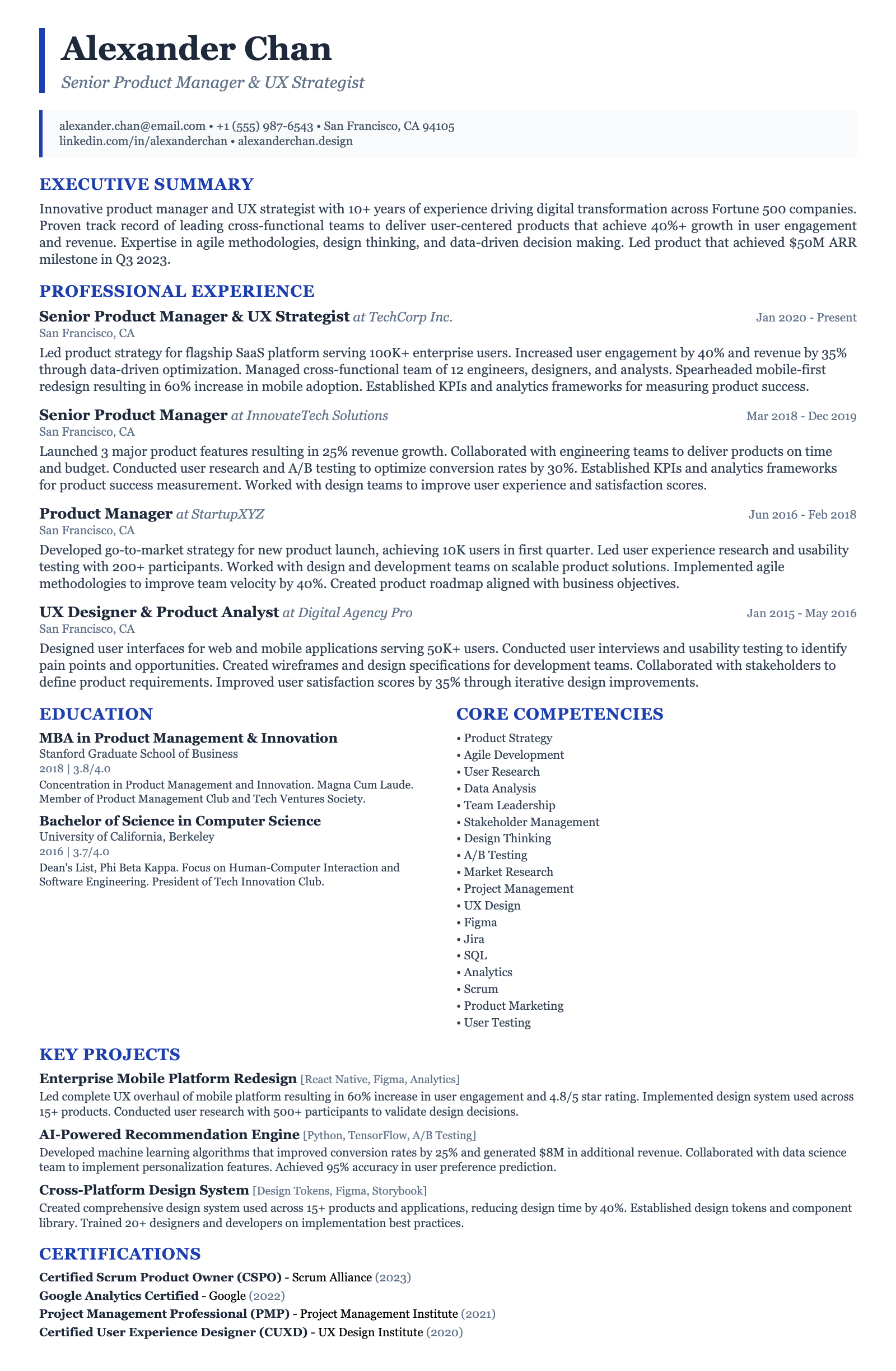
ATS-friendly templates designed specifically for Principal Education UX Designer positions in the US market.
Frequently Asked Questions

How long should my resume be as a Principal Education UX Designer?

Ideally, your resume should be no more than two pages. Given your senior role, hiring managers expect to see a comprehensive overview of your experience. Prioritize your most relevant and impactful projects, and use concise language to convey your accomplishments. Focus on quantifying your contributions whenever possible, such as highlighting improvements in student engagement metrics or increased adoption rates of educational platforms. Showcase your expertise with tools like Figma, Sketch, and user testing platforms.

What are the most important skills to highlight on my resume?

Beyond core UX design skills, emphasize skills directly relevant to the education sector. This includes experience with learning theories, instructional design principles, and accessibility standards (WCAG). Showcase your proficiency with user research methodologies, particularly those used with students and educators. Highlight your communication skills, leadership abilities, and experience collaborating with cross-functional teams. Mention your familiarity with education-specific tools and platforms like LMS systems (Canvas, Blackboard) and educational data analytics tools.

How can I ensure my resume is ATS-friendly?

Use a clean, straightforward format with clear headings and bullet points. Avoid using tables, images, or unusual fonts that might not be parsed correctly by ATS systems. Incorporate keywords from the job description throughout your resume, particularly in your skills section and work experience descriptions. Save your resume as a PDF to preserve formatting while still being readable by most ATS systems. Ensure your contact information is clearly visible and easily parsable. Use standard section headings like 'Experience,' 'Skills,' and 'Education.'

Are certifications important for a Principal Education UX Designer resume?

While not always required, certifications can demonstrate your commitment to professional development and validate your skills. Consider certifications in UX design, usability testing, or accessibility. Relevant certifications might include Certified Usability Analyst (CUA) or certifications related to accessibility compliance. Highlight any certifications you have obtained and explain how they have enhanced your skills and knowledge. Mention any workshops, courses, or conferences attended to show continuous learning.

What are some common mistakes to avoid on my Principal Education UX Designer resume?

Avoid generic statements about your skills and experience. Instead, provide specific examples of your accomplishments and quantify your impact whenever possible. Don't neglect to tailor your resume to each specific job application. Failing to highlight your experience with education-specific tools and methodologies is a common mistake. Ensure your portfolio is up-to-date and showcases your best work. Overlooking accessibility compliance or learning theory is a major misstep.

I'm transitioning into education UX design from another industry. How can I make my resume appealing?

Highlight any transferable skills and experience that are relevant to the education sector. Emphasize your user research skills, your ability to solve complex design problems, and your experience working with diverse user groups. Take online courses or workshops in education-related topics to demonstrate your interest and commitment. Showcase any volunteer work or personal projects that demonstrate your understanding of the education landscape. Tailor your resume to emphasize how your skills and experience can be applied to the unique challenges of education UX design. Mention specific tools like Figma or Sketch to demonstrate core skills.

Ready to Build Your Principal Education UX Designer Resume?

Use our AI-powered resume builder to create an ATS-optimized resume tailored for Principal Education UX Designer positions in the US market.

Complete Principal Education UX Designer Career Toolkit

Everything you need for your Principal Education UX Designer job search — all in one platform.

Why choose ResumeGyani over Zety or Resume.io?

The only platform with AI mock interviews + resume builder + job search + career coaching — all in one.

See comparison

Last updated: March 2026 · Content reviewed by certified resume writers · Optimized for US job market